FC Mobile Beta controls
The buttons did not vanish. PlayStyles changed what the same gesture does.
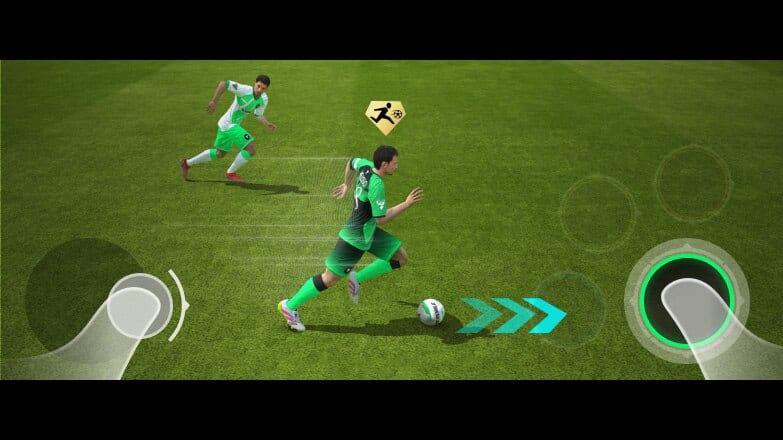
You do not need a new thumb overlay to test the Limited Beta. You need to know which old gestures the new PlayStyles hijack. This page is the on-pitch manual: how to trigger Finesse versus Power, standing tackle versus Slide Tackle, ground through versus Driven Lob Through. Pair it with the PlayStyles guide so you stop blaming “script” when you used the wrong swipe.
Creator ultra-graphics clips are useful for HUD layout (scoreboard, PlayStyle flash after a goal). They are not a substitute for ten minutes in the skill games menu.
Movement and dribbling
The virtual stick still moves the player. Sprint is still the extra button. What changed:
- Rapid makes sprint-dribble acceleration bite harder. Tap sprint after the first touch, not before, or you will knock the ball into the CB.
- Trickster speeds skill moves. If you use the skill stick / skill button, Gold Trickster keeps the ball closer. If you never skill, remap your brain to pass earlier instead of forcing elastico muscle memory EA already nerfed in the World’s Game notes.
- Bruiser is not a button. Shield by holding position with your back to the defender. The style only shows up in the jostle.
Practice a 20-meter Rapid carry in PvE before you do it on a Gauntlet objective that bans tackles and leaves you 1v1.
Passing: ground, through, lob, driven lob
Default ground pass is the simple tap. That is Tiki Taka territory — faster, stickier ground balls. Bullet Pass is the driven version of that ground ball; use the driven-pass gesture (usually a harder swipe or the driven modifier, depending on your control scheme).
Incisive Through Pass needs an actual through-ball input, not a ground pass into space. Aim ahead of the Rapid runner. If you still pass to the closest feet, you will swear the new style is fake.
Driven Lob Through is the lobbed through-ball input with extra lead and curve. Use it against a high Game Plan line (Ultra Attacking opponents). Overuse it against Ultra Defensive and you donate possession.
Whipped Cross is the cross button from wide, not a random through ball from the corner flag. Look up for Precision Header teammates before you spam it.
If your control scheme is Classic versus Alternative, open settings once and name the through-ball button in your notes. The beta is a bad time to discover you remapped it last year.
Shooting: placed, finesse, power, chip, free kick
- Clinical Finisher — ordinary shot swipe, mid/close. Do not add extra curl.
- Finesse Expert — finesse modifier (usually a curved swipe or finesse button) from the corner of the box.
- Power Shot — power-shot modifier. Gold wants a lower, faster strike; do not hold it like a 40-meter worldie unless you have the attributes.
- Chip Shot — chip modifier when the keeper is a Rush Out maniac.
- Dead Ball — free-kick camera. Aim around the wall; the style adds dip and curl. Practice one left-foot and one right-foot taker in your Game Plans.
- Penalty Expert — penalty swipe. Gold paints a red dot after you swipe. Believe the dot more than last year’s memory.
A/B test on the same spot: five finesses with the specialist, five without. If the success rate is identical, you are triggering the regular shot.
Defending: stand, hard, slide
Anticipate is standing tackle. Jockey, then tap tackle when the attacker takes a heavy Rapid touch. Gold can tumble them. Spamming it from behind is still a card.
Guardian is the hard tackle. Same family, more violence, more foul risk. Use it on Bruiser midfielders who invite contact, not on the sideline.
Slide Tackle (new PlayStyle + general range buff) is the slide button. The animation is quicker and the radius is greedier. That means:
- Last-ditch slides in your box will connect more often.
- Missed slides will look even more stupid because you traveled farther.
- Ultra Attacking Game Plans leave space behind you; do not slide in at the halfway line unless you like Driven Lob Through against an empty net.
Jockey first. Slide last. The style does not make a bad decision legal.
Goalkeeping
You rarely manual-GK in mobile, but identities still matter. Deflector punches to safer grass. Rush Out closes chip-less strikers. If you keep conceding rebounds, the problem may be a missing Deflector, not your controls thumbs. Swap the keeper in squad building before you raise gyroscope sensitivity.
HUD things testers should notice
The Limited Beta refreshes pre-match lobby, in-match HUD, and post-goal presentation. PlayStyle icons can flash on the item and after a goal. Use that as feedback: if you meant to finesse and the icon that pops is Power Shot, your modifier failed. Creator comparison videos on what’s new show the scoreboard and replay skin if you care about cosmetics.
A 15-minute practice script
- Skill game or PvE: 10 through balls with Incisive, 10 lobs with Driven Lob Through.
- 10 finesses, 10 power shots from the same hash mark.
- 10 standing tackles, 10 slides on a dummy attacker.
- One Dead Ball free kick from 22 meters each side.
- Pause and swap Game Plans twice so the muscle memory includes the menu.
Then play a real match. Controls that only work in the tutorial are not controls you have learned.
Frequently Asked Questions
Quick answers testers actually search for.
Did EA add a new button for PlayStyles?
No. Identities modify existing shots, passes, and tackles. See the PlayStyles guide for which action maps to which style.
How do I trigger Driven Lob Through?
Use the lobbed through-ball input, not a ground pass. It shines against high lines set in Game Plans.
Should I spam Slide Tackle now that range is up?
No. Missed slides travel farther. Jockey, then slide. Practice in PvE before Gauntlet.
Why do my finesse shots still feel normal?
You are probably firing a regular shot or using a card without Finesse Expert. Check the item icon, then the modifier.
Where can I see the new HUD?
In any beta match. The embedded gameplay video and the what's new page show the presentation changes.